AI Juggler · free & open source · macOS
Out of quota mid-project?Keep the session going.
Carry your session on with another account or tool: the conversation, your rules and your uncommitted changes come along. Keep working in the apps you already use, and switch back when your limit resets.
- Every feature of the official apps
- Your own sign-ins, never read
- No proxy
- Never switches on its own
- MIT
- macOS 14+
Simulated · not the real appWorkClaude Code · CLI PersonalClaude Code · CLI Side projectCodex · CLI · beta
Watch the Work session run…
25 seconds, the whole idea.
Muted · captions on screen
How a switch works
Three steps. The middle one is automatic.
- 1
Pick where it goes
Another account of the same tool, or another tool, ranked by how much room each has left.
- 2
The session carries over
The conversation, your rules, the task list and your uncommitted changes come along. You see what carries over before you confirm, and the original stays resumable.
- 3
Keep working
On another account of the same tool, it's the same session, resumed. In another tool, it picks up from the story so far (beta). No re-explaining the project to a blank prompt.
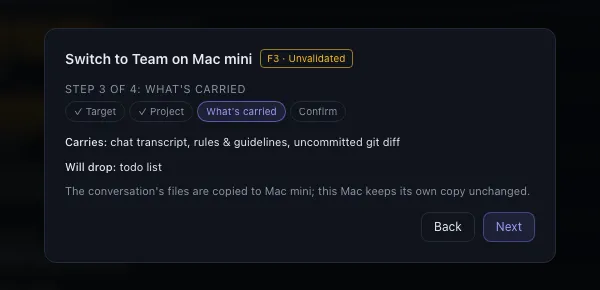
Your AI coding apps and CLIs. Every account.
AI Juggler works alongside the real, unmodified tools you already use, on your own subscriptions, and carries your session on between your accounts and tools. Switching to another tool is in beta.
When your limit resets
Switch back. Pick up the thread.
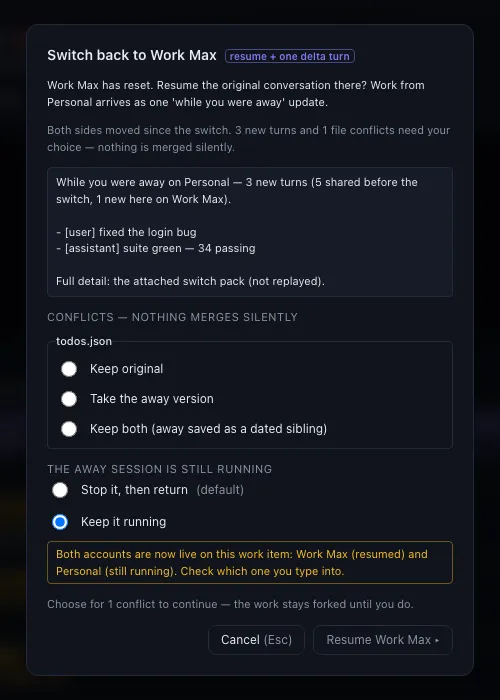
Switching back resumes your original session with a short summary of what happened while you were away. If both sides changed a file, you choose. Nothing merges silently.
Start anywhere. Switch when you hit the wall.
Free and open source. One Universal app for macOS 14 or later, signed and notarized.
Download AI JugglerAI Juggler · GitHub · All versions and channels · Release notes · @figurehead__ai