Start anywhere. Switch when you hit the wall.
AI Juggler runs all your AI coding subscriptions — Claude Code, Codex, ZCode and more — side by side in one Mac app. Set up every account in a minute, move a session to another account or tool when you run out of quota, and see every process your agents start.
The problem
More subscriptions, more juggling.
If you vibe code every day across a couple of plans and a few different tools, you know these.
You hit the limit mid-refactor.
The only way to keep going is another tool, a fresh session, and explaining the whole task again.
Your second plan lives behind an alias.
A config directory per account, a login per account, and nothing stopping a session from billing the wrong one.
Twelve terminal tabs, one waiting on you.
Which agent is working, which is stuck, and which asked you a question twenty minutes ago?
Activity Monitor is full of node.
Dev servers, watchers and MCP servers your agents started — still holding ports and memory after the session ended.
[ 01 ] Switch
Out of quota? Take the conversation with you.
When an account runs dry, move the session to another account or another tool and keep working — no new chat, no re-explaining. When the original window resets, switch back and pick up where you left off.
Switch as often as you like, in either direction. AI Juggler prepares everything; nothing moves until you click.
- Same tool, another accountThe original session, resumed as-is.
- Another toolThe full conversation replayed, plus todos and rules — CLAUDE.md becomes AGENTS.md. Beta, with a fidelity rating you see before switching.
- Switching backYour original session, plus a summary of what happened while you were away.
[ 02 ] Accounts
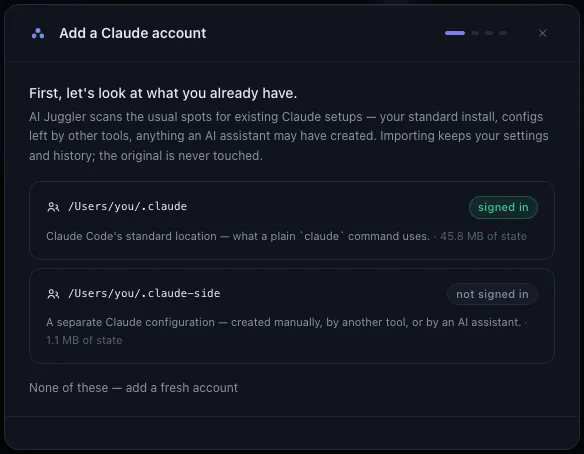
Every account set up in a minute.
AI Juggler looks for the setups you already have — config folders like~/.claude and ~/.codex, your shell aliases, profiles from other switcher tools — and imports a copy. Your originals are never touched.
Each account runs in its own isolated config, so a work plan, a personal plan and a second tool can all run at the same time. Signing in uses each tool's own login, right inside the app.
[ 03 ] See
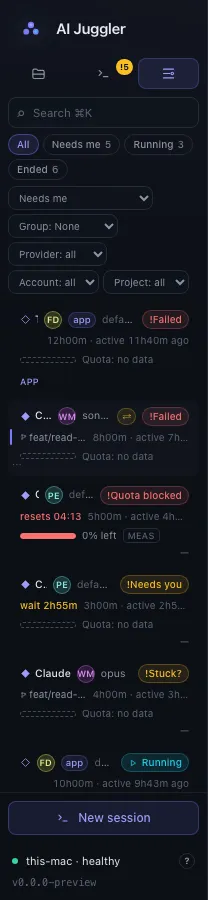
One board for every session.
Every session from every tool and account, in one list. Whatever has been waiting on you longest is at the top. A session that goes quiet is flagged Stuck? with the reason — "no output 6m · CPU 0.3%" — so you can trust it instead of checking every tab.
- Running
- Needs you
- Stuck?
- Quota blocked
- Finished
- Handed over
Click any session for its usage, history, quality and processes — or open its terminal right there.
[ 04 ] Usage
Know which account has room before you start.
Two clocks for every account: the 5-hour and weekly windows, and your renewal date. AI Juggler forecasts when each account will run out at your current pace, and estimates what your sessions would cost at list prices.

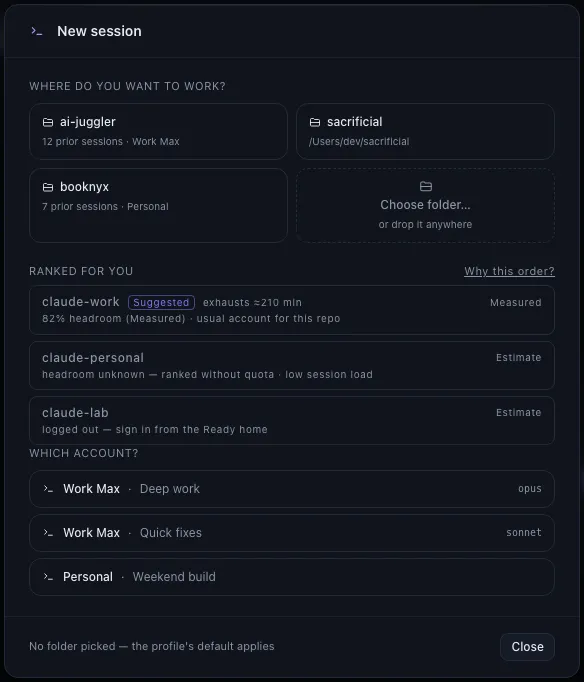
New session? It suggests where.
Pick a project and your accounts are ranked by headroom, the account you usually use for that repo, and how busy each one is. "Why this order?" shows the reasoning, and an alert tells you when a blocked account resets.
[ 05 ] Processes
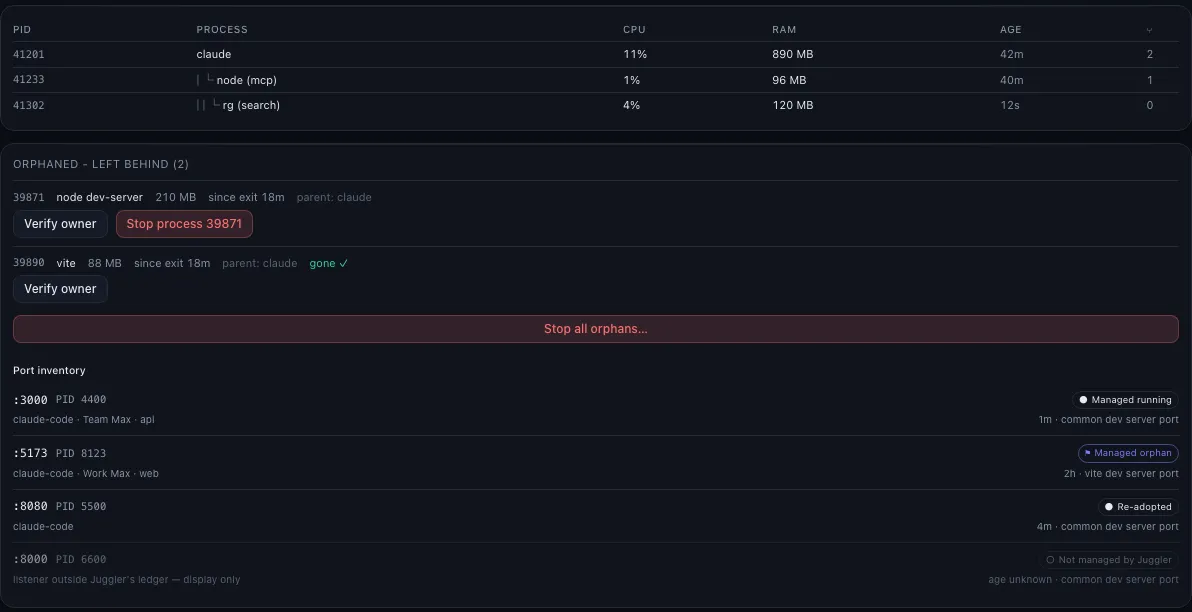
See what your agents leave running.
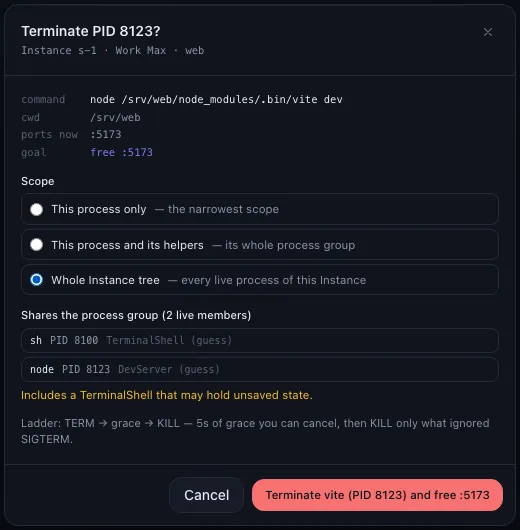
Every CLI and every sub-process it starts — dev servers, watchers, MCP servers — with live CPU and memory, tracked from launch to exit. When a session ends, anything still running shows up with the port it holds and the session it came from.
Stop leftovers in a click: AI Juggler double-checks it's the right process and shows exactly what will stop. Or let it tidy up dev servers automatically, per account. Memory hogs and idle processes get a heads-up.
[ 06 ] Fleet Beta
Your Mac mini, too.
Leave long runs on a desktop Mac and watch them from your laptop. Pair a machine by typing a code, and its sessions, usage and alerts show up in the same board.
Machines talk directly over your network or your own VPN with mutual TLS — no cloud relay, and logins never leave the machine they're on.
Also in the box
Small things that add up.
A worktree per session
Run three agents on one repo. Each gets its own git worktree and branch, so they can't overwrite each other.
Wrong-account warning
Every session shows the account it's billing. If one starts under the wrong account, you hear about it right away.
The model that's really running
Launched with one model, switched mid-session? The session shows what it's actually running now.
Quality you can read
Errors per turn, tokens per minute, context used — plain numbers instead of a made-up score.
Jump to any session
⌘K to find a project, account or session. One click brings its terminal to the front.
Native and quick
A Rust core in a small native app. Light and dark themes. If it ever quits, your sessions keep running and are picked back up.
Plays by the rules
Your accounts, your logins, the real CLIs.
AI Juggler starts the tools you already have, unmodified, under accounts you own. It never:
- ✕Read, store or sync your provider logins
- ✕Automate a sign-in or one-time code
- ✕Proxy or intercept model traffic
- ✕Switch accounts on its own to dodge limits
Open source
MIT-licensed. Read it, fork it, add a tool.
Built in public in Rust and Tauri. Each supported CLI is one adapter trait, so adding another tool doesn't touch the core. The design decisions are in the repo too.
Stop juggling by hand.
Free and open source. One Universal app for Apple Silicon and Intel Macs, with automatic updates.
Is it free?+
Yes. AI Juggler is free and open source under the MIT license.
Which tools does it work with?+
AI coding CLIs like Claude Code, Codex and ZCode, with more on the way. Every tool plugs in through an adapter, so adding a new one doesn't change the core — and you can write your own.
Does it touch my logins?+
No. You sign in with each tool's own login, inside the app. AI Juggler never reads, stores or syncs your credentials, and it runs the real, unmodified CLIs.
Is using several accounts allowed?+
The providers allow one person to hold several paid accounts. They don't allow sharing accounts, reselling access or getting around per-account limits — AI Juggler doesn't do any of those, and it never switches accounts without your click.
Does switching between providers keep everything?+
Between two accounts of the same tool, the original session is resumed as-is. Between different tools, the full conversation is replayed in the new one, along with your todos and rules. That's marked beta, and you see what carries over before you switch.
Does anything leave my machine?+
No. Sessions, usage and history stay local, and there's no telemetry unless you turn it on. An optional Figurehead account adds encrypted settings backups and an easy way to link your machines.
Windows or Linux?+
AI Juggler is macOS first. Windows and Linux come later.